Showing posts with label free photoshop brushes. Show all posts
| 3 comments ]

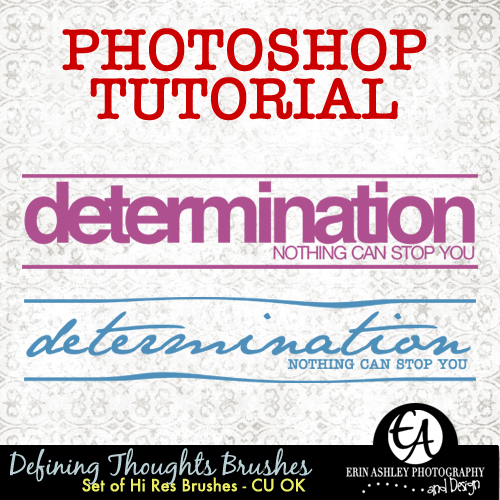
Defining Thoughts Brushes Tutorial

CLICK ON THE PICTURE TO DOWNLOAD


So yesterday I gave away a set of brushes I called, "Defining Thoughts". I received a few emails wanting to know how I made them, so I thought I'd share my process with you. Today's freebie includes the brush we're going to create together in this tutorial, plus a bonus alternate version. Keep in mind that I am using Adobe Photoshop CS4, so you may have to make adjustments.
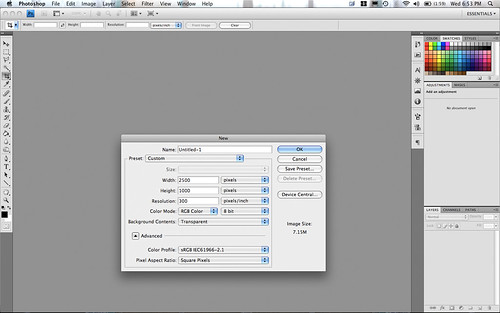


Create a new document with the following measurements:

Width: 2500px
Height: 1000px
Resolution: 300
Background Contents: Transparent

A brush can be a maximum width or height of 2500px, so we're going to go all the way.
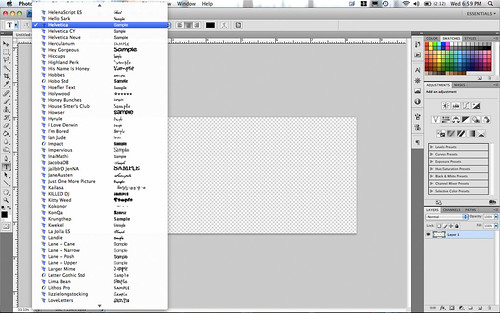


Grab your Text tool (PC: Ctrl + T / MAC: CMD + T) and choose a sans serif font. I'm using Helvetica Bold, but something like Arial will work. DaFont.com is a great resource for free fonts.
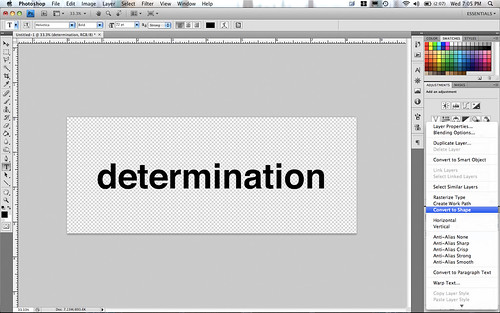


Type out the word "determination" in lower case letters and set the type.
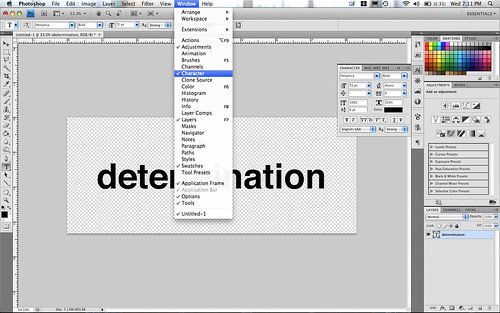


Go under Window and make sure to that Character is checked and open the Character palette.
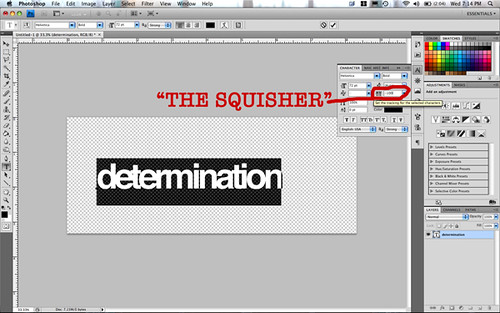


Highlight the word and in the character palette, we're going to move the letters closer together. I have no idea what that little feature is called, so I'm going to call it, "The Squisher" because that's exactly its function in this case! I used -100, but depending on your font you may need more or less. Hit the check mark to commit the type.
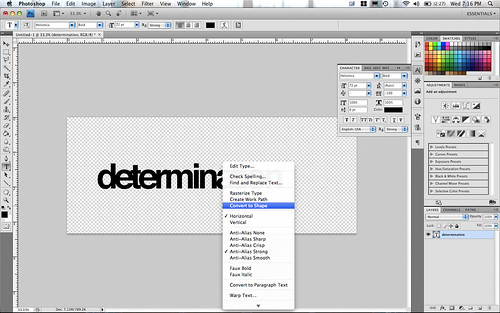


Right click on the word and choose, "Convert To Shape". This now converts the text to a shape and gives you a crisp looking word no matter how large you stretch the font. You could even save the shape and use it again in the future.
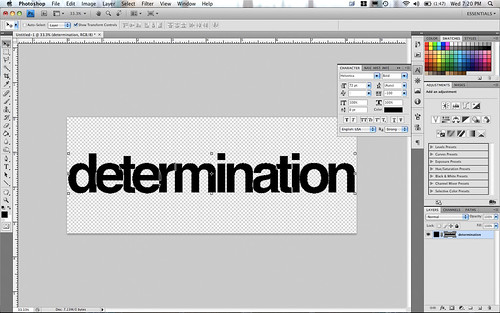


Stretch the text to fit the document by holding down the Shift and Alt keys. This will keep you from having distorted text. Your text should be quite large and fill the document.
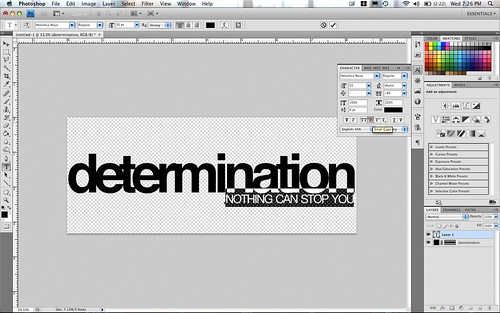


Now we're going to write the phrase below "determination". Select the Text Tool again (or hit the letter T as a short cut). Select another sans serif font. This time I'm using Helvetica Neue Regular. My font size is 35pt and I've changed "The Squisher" to -80. Instead of turning caps lock on, check the TT feature in the Character bin. This will instantly turn your lower case letters in upper case. Type the phrase, "NOTHING CAN STOP YOU".
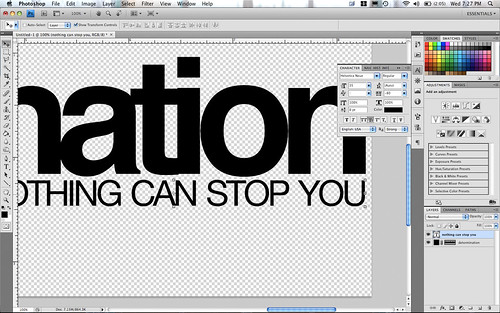


Move the text to the far right and line it up under the last letter. Looks pretty sweet so far, doesn't it?
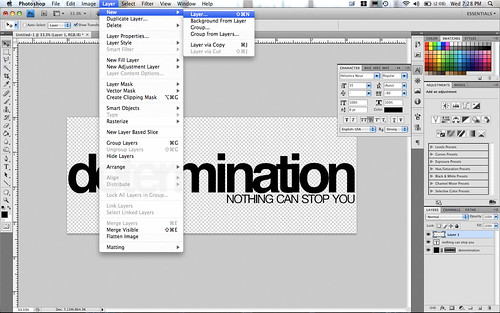


Now we're going to draw the lines, so create a new layer.


Select the Custom Shape Tool (hit the letter U for a shortcut) and then select the line tool. My line weight is 20px. Hold down the shift key and draw a line spanning the width of the document.
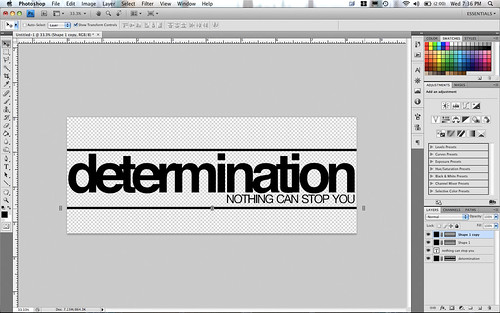


Now hit CTRL + J (CMD + J for MAC) to duplicate the layer. Hit V to select the move tool. Hold down the Shift key and drag the duplicated layer below the text. Feel free to move your lines around to get them just right.
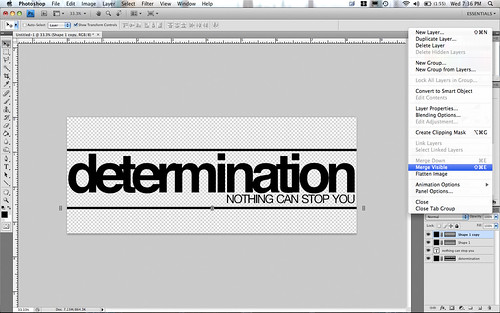


Select "Merge Visible" from the drop down menu in your layers palette.
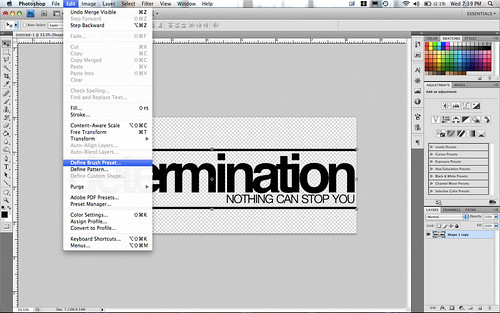


Now, you can trim away the extra pixels if you'd like and save it as a PNG file. For now though it won't matter be we're now going to turn this bad boy into a brush. Go up to EDIT and select "Define Brush Preset".
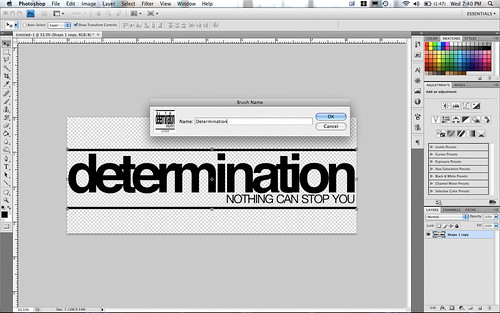


Create a name for the brush - I called it Determination - and hit OK. You now have a brush!


Select the Brush Tool (hit the letter B for a short cut) and you'll see that your brush is loaded and ready to go!
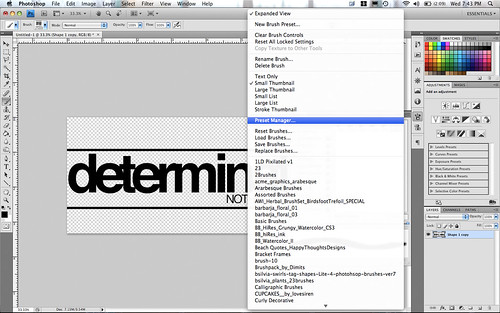


To save your brush, select Preset Manager from the drop down menu on your brush palette.
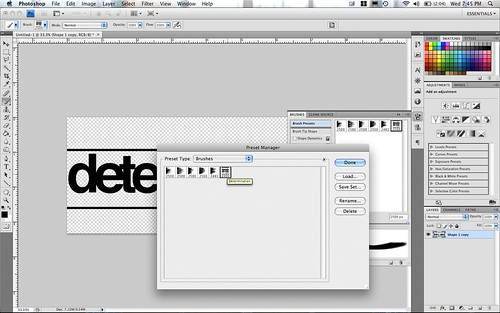


Highlight the brush (or brushes) you want to appear in the set. Hit Save Set, create a name for your group of brushes, and save them in your brushes directory.


Now you can go wild - try different fonts (I used Jane Austen and American Typewriter here) and change the line. You are only limited by your imagination!


...CLICK HERE TO READ MORE...

| 10 comments ]

Defining Thoughts Brushes

CLICK ON THE PICTURE TO DOWNLOAD


Just want to say thanks to the many people who leave comments when they download. Props to Andi from Canada who downloaded just about everything I've done AND left a comment on each one! Wow! I really appreciate you taking the time - it let's me know my work is appreciate and that you enjoy using my designs :D. Soooo, I guess what I'm saying is thank you for thanking me :D Enjoy the freebie!


...CLICK HERE TO READ MORE...

| 4 comments ]

EAD_Feel The Love
CLICK ON THE PICTURE TO DOWNLOAD

Oy. That's the last time I ever do that again. Yesterday evening I skipped dinner because I wasn't hungry. Come 8PM though, I suddenly felt very hungry. Instead of eating a meal, I hunted for what looked good to eat in the fridge. I found some macaroni salad and ate the remaining bit, about a 1/2 cup. Note to self: never eat macaroni salad without finding out the expiration date.

I woke up at 1AM with a rock in my stomach and I knew I was no good from there. You can guess what happened! Let's just say that my Saturday plans have been royally messed up. So instead of doing what I planned, I've spent virtually the whole day on the computer. I put together a kit all about ice cream (I'm putting the finishing touches on it - you'll see it in the coming days :D) and some other things...including these brushes. Probably the brightest spot in my whole day was finding out that BLURB has just unveiled a new 12x12 book!!!!! I squealed when I saw it!!! A 40 page book is 59.95 which works out to $1.50 a page; an 80 page book is $70.95 and works out to about .90 cents a page. Seriously, can you get any better than that? You can't even print an 8x10 picture for that price! I heart Blurb in a big way.

Download the brushes and enjoy! Don't forget to leave your blog link when you comment. I'd love to visit it!


...CLICK HERE TO READ MORE...

| 3 comments ]

EAD_Beautiful Words Brushes

CLICK ON THE PICTURE TO DOWNLOAD


This week I've been off my show and have been filling in on the morning show. I've hated getting up at 4:45AM every morning (I have noooo idea how they do it day in and day out), but I have enjoyed having the entire afternoon to do whatever I want! My brother and I went to go see Night At The Museum 2 and it was super cute. Hank Azaria as the villain was just pure genius. On the way home, I flipped on the radio to hear how my show partner was doing. I was greeted with static.

I felt instant panic. Radio and dead air do not go together! Unfortunately, some very severe thunderstorms rolled through our area and the studio was hit by lightening and virtually everything electrical was fried. My show partner was fine - just wigged out a little when it happened! We are blessed to have an auxiliary tower and studio. They don't have near the amount of power and clarity of the main studio, but when you broadcast to 126,000 people daily, it's better than nothing! Our engineer says it's the worst lightening strike we've had since 1989. If you would, please pray that we can find the necessary parts and finances to replace what needs to be replaced (or else I'm going to have to start selling some of my scrapbooking supplies for donations!). The damage is pretty significant and the replacement pieces cost MAJOR money. God knew lightening was going to strike our station, and while it caught us off guard it didn't catch Him. We know he's already got this one figured out, so we're going to trust in Him to make the repairs and finances work out.

Here are some brushes I put together today. Enjoy and download here!


...CLICK HERE TO READ MORE...